
 Sumi
Sumi
Inking your second brain
Write it down and Sumi always remembers where you put it.
Sumi has no folder to choose and no list to scroll. You put a thought in and stop thinking about it — then type one word, and the note is there before you have finished asking. Not a list narrowed down: the answer, ranked, with the matching line already showing.
Every note is sealed on your device before it is written, and the search index with it. That is not a feature you switch on; it is what the app is. It is simply not the reason to use it.
No account, no ads, no tracking.
Twelve languages · nothing leaves your devices
You do not look for a note. You type a word.
Most notes apps ask you to file things so you can find them later. Sumi asks you to write, and takes care of later itself. There is no folder to pick when you save and no list to scroll when you return — the search field is on the one screen there is, and fifty thousand notes come back in well under a tenth of a second. Encrypted, which usually costs you exactly this, and here does not.
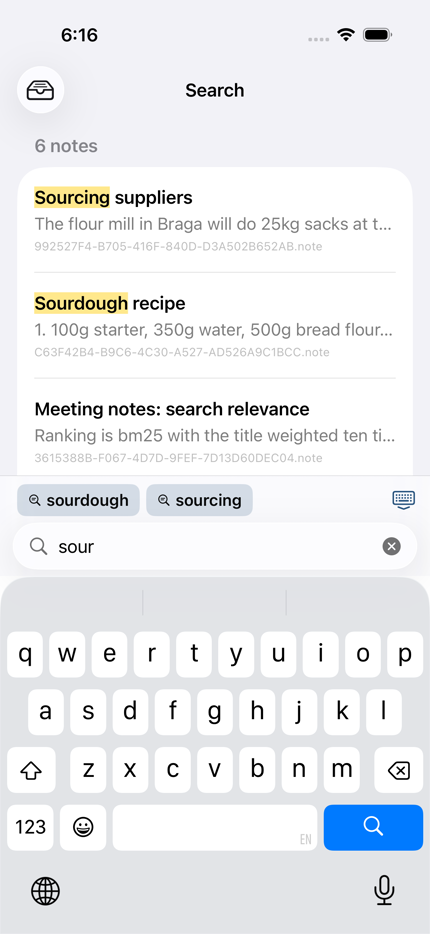
Narrows on every keystroke
The word you are still typing is treated as a prefix, so sourdo already finds sourdough. You never have to finish the word to see the answer.
The right note first
A match in a note's title counts for ten times a match in its body, and a note edited today gets a mild nudge upward. A note actually about a subject still beats a passing mention.
Finds the word you didn't type
A second, stemmed index runs alongside the literal one, so recipes turns up “Sourdough recipe”. Exact hits stay at the top; the stem matches follow.
Shows you why it matched
Each result carries a snippet with the match highlighted in place — and the highlight survives into the editor, so you open a note already looking at the line you were after.
Suggestions from your own words
The bar above the keyboard offers the most common words that actually exist in your notes, plus your recent queries — so you never search for something that cannot be found.
Step through a note's matches
Open a result and the word is highlighted everywhere it appears, with a counter and arrows to walk them. A long note stops being a page you have to read to find the line you already searched for.
Or narrow the library instead
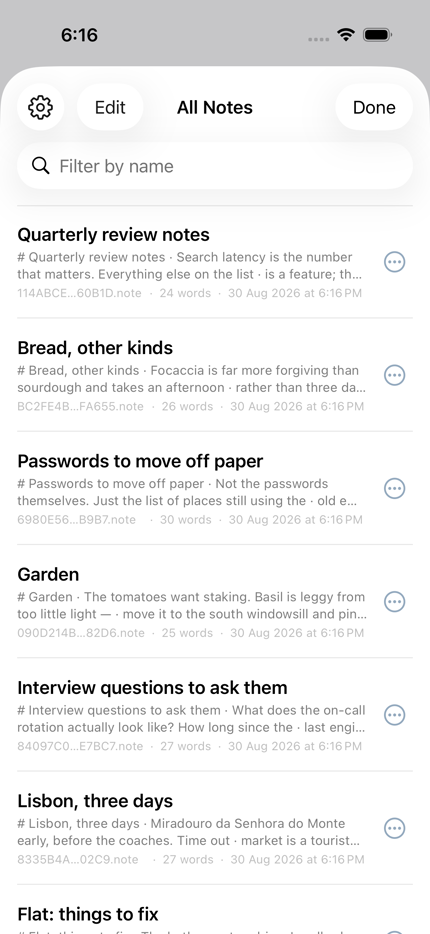
When you are not looking for a word but for a week, the notes list filters by date written or edited, by tag, and by name — and says how many of how many it is showing, so a cap never truncates in silence.
Always searching what's on screen
Edits are flushed to disk and to the index before a search runs, when you switch notes, and when the app leaves the screen. What you can see is always what you can find.
What it looks like
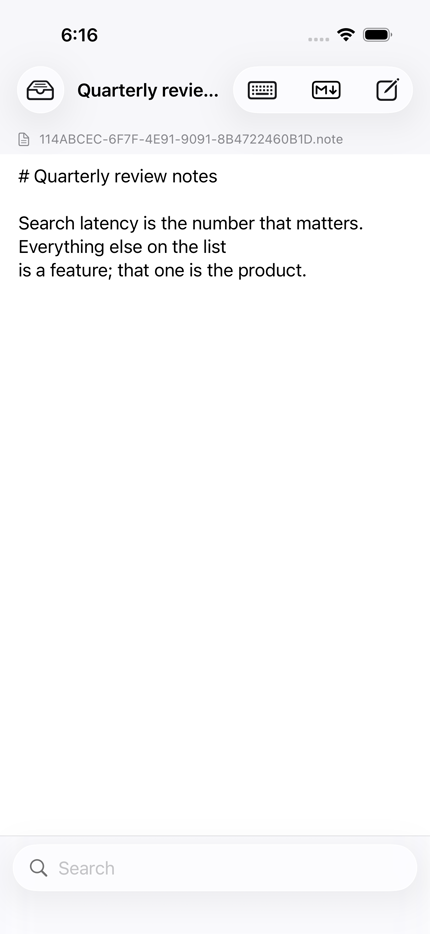
Three screens, straight off a phone. There is one page: you write on it, and you search from it.
A query language you already know
Type words and get every note with all of them. When you need to be exact, the usual operators are there — and there are keys for them above the keyboard.
| You type | You get |
|---|---|
sqlite index | Notes containing both words |
"full text" | That exact phrase |
data* | Anything starting with data |
-draft | Everything except notes with draft |
plan OR spec | Either word |
Inking your second brain
A second brain is not a better filing cabinet.
The phrase is Tiago Forte's, from Building a Second Brain, and the idea underneath it is older than the book: your mind is for having ideas, not for holding them. A second brain is the place outside your head where the holding happens — every note, quote, half-thought and decision, written down once and reliably found again — so the head is free to do the part only it can do.
Why people want one now
The case used to be about overload: more arrives in a day than anyone can remember, so write it down. That is still true, but the current thinking has moved on to something sharper. What matters is not how much you keep but how cheaply you can get it back. A note you cannot find is worse than no note, because you paid to write it and then paid again to lose it. Memory is not a recording; it rewrites itself every time it is used, so the version in your head drifts and the version on the page does not.
And a second brain has become the one corpus that is unmistakably yours. Every general model knows what a ferry is; none of them knows what you concluded about the ferry timetable in March. A library of your own words, in your own vocabulary, is the thing that nothing else can be trained to replace.
Why most of them fail
Almost always at the same step. Capturing is pleasant; organising is a chore that feels like progress. So people build elaborate structures for notes they have not yet written, tidy instead of think, and stop when the tidying gets ahead of the writing. The collection grows and the retrieval does not. The method below is designed around that failure — and so is Sumi, which takes the position that the organising step should be the app's job wherever it can be.
The method: CODE
Four verbs, in the order a thought passes through them. Everything else in the book is detail on one of these.
Capture
Keep what resonates — the line that made you stop, not the whole article. Capture is meant to be quick and a little indiscriminate; its only rule is that there is one place things go, so nothing has to be remembered twice.
Organise
Sort for action, not for subject. The question is never “what is this about?” but “when will I need it?” — which is what PARA, below, is for. Done later and lightly, never as a condition of saving.
Distil
Each time you return to a note, make its point easier to see than it was: bold the sentence that matters, add a heading, write a two-line summary at the top. Progressive, so the work is spread across every visit rather than done once and forgotten.
Express
The point of keeping anything is to make something with it — a decision, a draft, a message, a talk. A second brain that is only ever read into is a diary. Expressing is what tells you whether the other three steps worked.
The structure: PARA
Four places, sorted by how soon you will act on them. A note moves between them as your life does; nothing is filed for good.
| Place | What goes there | For example |
|---|---|---|
| Projects | Short-term efforts with a goal and an end date. Where most of the attention goes. | Launch the pilot; renew the lease; the talk in October |
| Areas | Ongoing responsibilities with a standard to keep but no finish line. | Health; the team; the flat; finances |
| Resources | Topics you are interested in and may draw on one day. | Sourdough; RFID; typography; the history of ferries |
| Archives | Anything inactive from the three above. Kept, out of the way, still searchable. | Last year's projects; a hobby that lapsed |
Read it top to bottom and it is a ranking by actionability. Projects are looked at daily, areas weekly, resources when they come up, archives when search brings them back. That is the entire scheme, and it is deliberately small enough to hold in your head — which is the only place a filing scheme is ever consulted.
Getting there, in order
- Choose one place, and make it the only place. The system fails the moment a thought could go into two of them. Put everything in the same app, on every device you carry.
- Capture for a fortnight without organising at all. Learn what you actually keep before deciding how it should be arranged. Most structures are built for the notes people imagine writing.
- Name your projects. Write the list of things you are trying to finish this quarter. That list is the top of PARA, and every note that helps one of them takes its name.
- Sort the rest by action, not by topic. Area, resource or archive. If it takes more than a few seconds to decide, it is a resource.
- Distil on return, never on arrival. When search brings a note back, leave it clearer than you found it. A bold line, a heading, a summary at the top.
- Link when you notice a connection, not before. A link written at the moment two ideas touch is worth a hundred filed on principle. Let the app suggest the ones you missed.
- Review weekly, lightly. Ten minutes: close what finished, move it to the archive, look at what the week captured. Not a reorganisation — a glance.
- Make something. Once a month, produce a thing that could only have come from the notes. If you cannot, the pipeline is blocked somewhere above, and the notes will tell you where.
Where Sumi comes in
Sumi is built for the step people abandon. It has no folders because a folder is a decision demanded at the moment you least want to make one — and because the second brain's promise is retrieval, not filing. Everything here exists so that organising can be done late, lightly, or not at all, and the note still comes back.
Capture: the page is already open
There is one screen, and the note exists from the first keystroke — no title to invent, no location to choose, no save. The first line becomes the name. On iPad you can write by hand with the Pencil and it is read into text. Files dropped into the Files app, or a folder of markdown imported in one go, are picked up and indexed like anything typed.
Organise: PARA as tags, not folders
A note can only be in one folder; it can carry several tags. Type #pilot for the project and #health for the area, in the text or beside it, and the filter bar offers the ones you already use. Moving something to the archive is changing a word. A note that serves two projects simply says so.
Distil: markdown at the cursor
Headings, bold, lists and checkboxes are keys on the bar above the keyboard, and each acts where you are rather than at the end of the note. Read in the rendered preview, switch back to sharpen a line, and Sumi remembers which side you left each note on.
Express: it leaves as plain text
Share a note and what arrives is readable markdown. Print it and it lays out as pages. Export the whole library and it is a zip of .md files any editor of the last thirty years can open. A second brain you cannot take with you is somebody else's.
What is built in
The parts that do the organising for you. None of them rewrite a word you wrote; they only decide what to show beside it.
The search engine
A full-text index over every word of every note, answering as you type: the word in progress counts as a prefix, a stemmed index runs beside the literal one so recipes finds recipe, a title match weighs ten times a body match, and a note edited recently breaks a tie. Fifty thousand notes come back in well under a tenth of a second, with the matching line highlighted in place. Twelve languages, and Chinese and Japanese are indexed by character.
Related notes, found for you
Beneath the note you are reading sits a row of the notes that belong with it. Sumi finds the words that are distinctive to this note in your library — not common English, but the terms that only your notes use — and pairs it with the other notes that share them. Open a chip and the words the two have in common are shown, so a suggestion always comes with its reason.
Links you write, and links waiting
Type [[ and the titles of your notes are offered as you go. A link you wrote yourself outranks one the app inferred, and it is marked as yours. Every note shows what links to it, with a count. A link to a note that does not exist yet is not an error — it is listed as waiting, and becomes the outline of what to write next.
A vocabulary learned from you
Two words are associated when they turn up in the same notes more often than either does alone. Sumi works that out from your library, not from a downloaded model, so it learns what Inventrack has to do with Zebra without ever having heard of either. When a search finds fewer than three notes it widens along those associations, and says so — direct hits first, the widened ones after.
What you keep returning to
The notes you open after a search are counted and nudged upward next time. The nudge is capped at a tenth of a result's score and held there by a test, so a note you happen to open often can never bury the note that actually answers the question. What the app knows about you is a visible, bounded term, not a thumb on the scale.
Your words stay the truth
Nothing here summarises, paraphrases or answers on your behalf. Every note is a plain markdown file, sealed on your device; the index, the links and the associations are all derived from it and can be thrown away and rebuilt. A second brain whose contents have been quietly rewritten by a model is no longer a record of what you thought — and you would be the last to notice, because the paraphrase is what you would be reading.
What it does not do yet, said plainly: it will not answer a question in sentences, and it does not know that “how wet was the dough” means hydration unless your notes have used the two words together. Search finds the note; the related row shows its context; the reading is still yours. The plan for what comes next is public, including the things that were measured and turned down.
The rest of it
Everything here exists because searching a pile of notes needs the pile to stay honest — nothing goes missing, nothing comes back, and the thing you deleted by accident is still there for a while.
Lists that carry on by themselves
Turn on list mode and every Return starts the next item — a bullet after a bullet, 3. after 2., an empty checkbox after a ticked one. Return on an empty item ends the list. The key is on the bar above the keyboard, so a checklist starts without leaving the text, and the mode belongs to the note: it is still on when you open it again, on any of your devices.
Tags, when a word is not enough
Type #ferry in the note or add one beside it — either way it is a tag, and the filter bar offers the ones you already use. Delete the text and the tag goes with it.
Deleting waits for you
Choose immediately, an hour, or three days. Until then the note sits in the Trash on every device, with Undo offered the moment you delete rather than buried in a screen you have to know about.
iPhone and iPad
One library, one key, one app for both — so a note written on the phone is searchable on the iPad with the same index, the same ranking and the same syntax.
Twelve languages
English, German, Spanish, French, Italian, Dutch, Portuguese, Russian, Japanese, Korean and both Chinese scripts. Chinese and Japanese search by character, because those languages do not put spaces between words.
Both sides of a conflict survive
Edit the same note on two devices while offline and you get both versions back, the losing one kept as a note of its own. Nothing is resolved by throwing half of it away.
Locked, if you want it
Face ID or Touch ID over the whole library, with a PIN behind it for the days the sensor will not read a wet thumb. You choose how long the app may sit in the background before it locks — immediately, or up to five minutes, because a lock that asks every time you check a phone number is a lock people switch off.
Sealed, without being asked
AES-256-GCM through Apple's own CryptoKit, with the key in your iCloud Keychain and the search index sealed under it too. There is no passphrase to invent and no mode to remember. The security notes are equally plain about what it does not protect you from.
Yours to take with you
Your notes are sealed files in your own iCloud Drive, syncing between your own devices. Because they are encrypted, they are not files you can read by opening the folder — so Sumi gives you the door instead.
Export all notes writes every one of them as plain markdown in a zip, ready for any editor written in the last thirty years. Import markdown brings files, or a whole folder of them, back in. Out and back with the text unchanged.
Sharing a single note works the way it always did — AirDrop, Mail, Save to Files — and sends readable markdown rather than the sealed file, because handing somebody a blob they cannot open is not sharing. Printing lays it out as pages rather than raw markdown.
Written for writing
Start typing on the page that's already open and the note is created for you; the first line becomes the title, and renaming from the notes list follows through.
The bar above the keyboard becomes markdown keys while you write — headings, lists, checkboxes, emphasis, code — and each one acts at the cursor rather than at the end of the note. The list-mode key sits at the front of that bar, lit while it is on. Tap through to a rendered preview whenever you want to read instead of write; Sumi remembers which of the two you left each note in.
One screen adapts to every device: on iPad your notes are a column beside what you are writing rather than a list behind a button, and on iPad the text is held to a readable measure instead of stretching the full width of the window.
What we can and cannot tell you
Sumi has no server, no account and no networking code of its own. There is no analytics, no advertising, no crash reporting and no third-party SDK. We cannot read your notes, and that is unconditional — there is nothing here to read them with.
What we will not claim is that nobody could ever. Your key lives in your iCloud Keychain and your files in your iCloud Drive, so what stands between them and Apple is Apple's own end-to-end encryption. We think that is the right trade for a notes app that has to just work, and we would rather say so plainly than imply more.
- Encrypted before it is saved. Not encrypted later, and not only when you remember to.
- iCloud Drive is optional. One switch moves the files into your own iCloud, and moves them back.
- Both sides of a conflict survive. Edit the same note on two devices offline and you get both back, not whichever landed last.
- Delete means delete — when you say so. Choose how long the Trash holds a note; after that its file is gone from every device. Removing the app takes the notes and the index with it.